















Start typing to see results...
Find the perfect solution
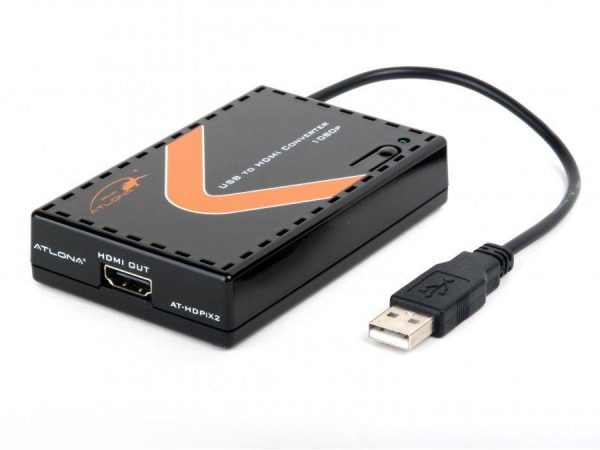
PC to TV converters bridge computer video output (typically VGA or DVI on older PCs, HDMI or DisplayPort on newer PCs) to a television display. Users want to display content from their computer to a TV for many reasons: showing a video file, sharing music or pictures, computer gaming on a larger screen, or simply using the TV as another display. PC to TV converters come in many connector combinations: VGA in to HDMI/component/composite/S-Video out, DisplayPort to HDMI, USB to HDMI, and others.
Common PC to TV conversions: VGA to HDMI (older PC to modern HDTV), VGA to component (older PC to legacy HDTV), VGA to S-Video or composite (older PC to standard-definition TV), USB-C with DisplayPort Alt Mode to HDMI (modern laptop to HDTV), DVI to HDMI (older PC with DVI output to modern TV). Many converters include both video and audio handling: the PC's audio (from headphone jack or SPDIF output) bundles into the converter's audio input and embeds into the converter's HDMI output, so video and sound reach the TV together.
Advanced PC to TV converters include built-in scaling to support a wide range of resolutions, typically up to 1920x1200 or 1080p (some support 4K). The scaler matches the PC's output resolution to the TV's preferred input resolution, eliminating issues where the TV displays the PC content at the wrong aspect ratio or doesn't sync properly. Scaling is especially important when bridging older PC VGA output (which may run at unusual resolutions) to modern TVs.
PC video signals like VGA and DVI carry no audio. PC to TV converters typically include separate audio inputs: 3.5 mm stereo (from the PC's headphone jack) or SPDIF (from the PC's digital audio output). The converter embeds the audio into the HDMI output (or whatever modern format it produces). This keeps video and audio together for the TV, which is essential for movies, gaming, and any content where lip sync matters. Some PC to TV converters also handle USB audio class for newer PCs.
When converting PC output (which may include HDCP-protected content from streaming services or Blu-ray drives in the PC) to TV input, the converter must handle HDCP properly. Quality converters support HDCP 1.4 or 2.2 depending on the content. Cheap converters often skip HDCP entirely, causing protected content (Netflix in a browser, Blu-ray playback) to fail with black screens. EDID management ensures the PC sees a consistent display description from the TV, regardless of which TV is connected, avoiding resolution surprises.
Many modern PCs already have HDMI or DisplayPort output, in which case a direct HDMI cable or DisplayPort to HDMI adapter is simpler than a PC to TV converter. PC to TV converters become essential when the PC has only VGA or DVI output (older laptops and desktop PCs), when the TV has only legacy inputs (composite, component, S-Video), or when you want built-in scaling and audio embedding to handle the conversion cleanly. For modern PC plus modern TV setups, a direct cable usually works.
PC to TV converters are common in residential setups (connecting an older laptop or PC to the family room HDTV for movies and gaming), gaming centers (PC games on multiple TV displays), schools (older classroom PCs to newer HDTVs replacing legacy projectors), boardrooms and corporate AV (older meeting room PCs needing to drive HDMI displays in newly renovated rooms), digital signage (older signage PCs to modern displays), and any installation where a PC with legacy video output needs to drive a modern TV or display.
You need a PC to TV converter when the PC's video output format doesn't match the TV's input format. The most common case is an older PC with VGA or DVI output and a modern HDTV with HDMI input. The converter bridges between them, with optional built-in scaling and audio embedding. If your PC has HDMI or DisplayPort output and your TV has HDMI input, a direct cable or simple adapter works without needing a full PC to TV converter.
Some do, but most are 1080p maximum because the most common input format (VGA) is electrically limited to about 1080p in practical installations. If you need 4K output on the TV, the PC must have a digital output (HDMI, DisplayPort, USB-C) capable of 4K, and you need a converter rated for 4K conversion. For VGA source to 4K TV, the converter will upconvert to 4K, but the source resolution is still VGA-limited and the upscaled image will not show true 4K detail.
Most quality converters do, with separate audio handling because VGA and DVI carry no audio. The converter accepts an audio input (typically 3.5 mm stereo from the PC's headphone jack, or SPDIF from the PC's digital output) and embeds it into the HDMI output so video and audio reach the TV together. Cheap converters may skip audio entirely, requiring you to route the PC's audio to the TV's separate audio input (or to external speakers). For movies, gaming, and any content where audio matters, choose a converter with audio embedding.
Quality converters do; cheap converters often do not. HDCP is the copy-protection handshake required by streaming services (Netflix, Disney+), Blu-ray playback in the PC, and many corporate sources. If the converter doesn't support HDCP at the required version (1.4 for 1080p, 2.2 for 4K), the protected content shows as a black screen on the TV. Always verify HDCP support for the kind of content you'll be displaying.
EDID is the data block the TV sends back to the PC describing its supported resolutions and refresh rates. The PC uses this information to choose an output mode the TV can display. Without EDID management, the PC may default to the wrong resolution when connecting through a converter, causing the TV to show no signal or to display the content at the wrong aspect ratio. A converter with EDID management presents a consistent EDID to the PC regardless of which TV is connected, eliminating these surprises and ensuring the PC always outputs a clean signal.
Residential setups (older laptops or PCs connected to family room HDTVs for movies, gaming, and casual computer use), gaming centers (PC games displayed on multiple TVs for events or LAN parties), schools (older classroom PCs driving newer HDTVs that replaced legacy projectors), boardrooms and corporate AV (older meeting room PCs needing to drive HDMI displays in renovated rooms), digital signage (older signage PCs feeding modern displays), training rooms with mixed equipment, and any installation where a PC with legacy video output needs to drive a modern TV.

On order over $300 and more for US and US territory

We Offer a 30-Day Money Back Guarantee

Full manufacturer's warranty and quality assurance

Safe checkout with trusted payment providers