















Start typing to see results...
Find the perfect solution
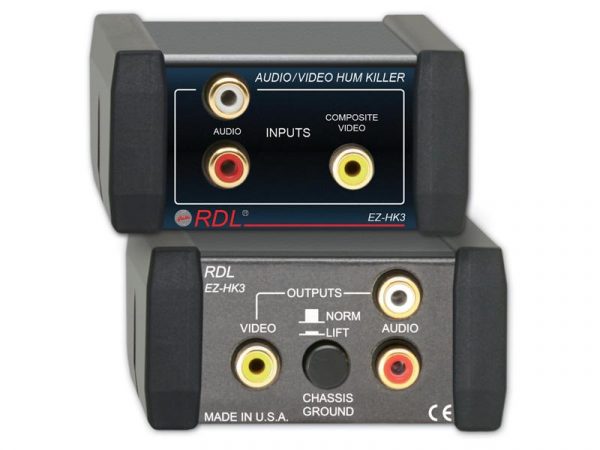
Composite video converters bridge composite video signals (the basic analog video format using a single RCA or BNC connector) with other video formats. Composite is the simplest mainstream analog video format, with all signal components (Y brightness, color, sync) combined on one wire, limited to standard definition (about 720x480 NTSC or 720x576 PAL). Despite digital video having largely replaced it, composite is still in regular use in security cameras, retro gaming, hospitality TV, broadcast monitoring, and any installation with existing composite sources.
Composite to HDMI is the most common conversion direction: bringing legacy composite video sources into modern HDMI infrastructure. The conversion is active: a digital encoder chip takes the analog composite input (plus separate audio inputs for stereo audio) and creates an HDMI digital signal with embedded audio. Most composite-to-HDMI converters include built-in upscaling to convert SD composite (480i or 576i) to HD or 4K HDMI for modern displays. Quality scaling matters: budget converters produce soft, blocky upscaled output; quality converters use motion-adaptive de-interlacing and edge-aware scaling for cleaner results.
HDMI to composite goes the other direction: connecting a modern HDMI source to a legacy composite display. This is less common but still useful for installations with existing CRT TVs, very old security monitors, or legacy projectors that only accept composite. The conversion is active: a digital-to-analog converter takes the HDMI digital video and reduces it to SD composite, with audio breaking out on a separate output. HDCP-protected content typically doesn't pass to composite output for the same reason it doesn't pass to other analog formats.
Composite video comes in regional standards (NTSC for North America, Japan; PAL for most of Europe, Asia, Africa, Australia; SECAM for France and parts of Eastern Europe). Composite converters must match the standard end-to-end: source, converter, and display must all use the same standard, or convert appropriately. Some converters include built-in NTSC-to-PAL (or vice versa) conversion for international installations, though this is rare. Always verify the standard the equipment uses before specifying the converter.
The big benefit of composite converters with built-in scaling is making SD content viewable on modern HD or 4K displays. Without scaling, the display does its own conversion of the SD composite input, which often looks soft or pixelated. A quality scaler in the converter takes the 480i composite input, de-interlaces it cleanly, removes analog noise, and upscales to 1080p or 4K with better algorithms than most displays use. The result is noticeably cleaner SD content on modern displays.
Composite video does not carry audio; audio runs on separate RCA cables for stereo. Composite converters typically handle audio by accepting separate audio inputs (when converting to HDMI, the audio gets embedded) or breaking out audio (when converting from HDMI, the audio goes to a separate output). Some converters support balanced or digital audio inputs for pro applications.
Composite converters are widely used in security and CCTV (analog cameras to modern recording or monitoring systems with HDMI or IP), retro gaming (preserving original consoles on modern HD or 4K displays), hospitality TV (legacy infrastructure connecting to modern displays), legacy video monitoring (medical, industrial, and broadcast monitoring where existing composite equipment is still in service), home theater (very old VCRs and DVD players to modern displays), and any commercial AV installation where composite equipment remains in use and needs to bridge to modern AV infrastructure.
You need a composite converter whenever you have to bridge composite analog video with modern equipment that uses HDMI, SDI, or other formats. Common scenarios: connecting a legacy security camera or recorder to a modern HDMI monitor, displaying a VCR or old DVD player on a current 4K TV, integrating retro gaming consoles with modern HD displays, bringing analog broadcast monitoring feeds into HDMI control rooms, or playing legacy training and museum content on current displays. The converter handles the format change and usually includes scaling to upscale the SD composite to HD or 4K for modern displays.
Up to a point. A quality composite converter with built-in scaling takes the 480i or 576i composite input, applies motion-adaptive de-interlacing, removes analog noise, and upscales to 1080p or 4K with better algorithms than most displays use natively. The result is noticeably cleaner SD content on modern displays. But the converter cannot add detail that was never in the source: 480i content has 480 lines of resolution regardless of how it's displayed. The improvement is in presentation (smoother motion, cleaner edges, less noise), not in true resolution.
Composite video carries no audio on its own connector. Composite converters handle audio separately: when converting composite to HDMI, the converter accepts separate stereo audio inputs (typically RCA red/white) and embeds them into the HDMI output; when converting HDMI to composite, the converter breaks out the HDMI audio on separate outputs. Always plan parallel audio cabling for composite installations, just as with the original composite video equipment. Most composite-to-HDMI converters include audio embedding as a standard feature.
Yes, very much. Composite video comes in regional standards (NTSC in North America and Japan; PAL in most of Europe, Asia, Africa, Australia; SECAM in France and parts of Eastern Europe). The converter must match the source's standard. Using an NTSC converter with a PAL source (or vice versa) produces garbled video or no picture at all. Some converters auto-detect NTSC and PAL; others require manual configuration. International installations may need a converter with built-in NTSC-to-PAL (or vice versa) conversion, though this is rare and typically used only when the source and display can't be matched directly.
Composite remains the most universally supported video format: nearly every video display ever made has a composite input. It is also electrically robust and tolerant of long cable runs (100 meters or more on quality 75-ohm coax), making it the workhorse for legacy security CCTV installations. Other major uses include retro gaming (where the original look on period CRT displays matters), hospitality TV systems with legacy infrastructure, broadcast monitoring of SD program feeds, and museum installations preserving period equipment. As long as the installed base exists, composite converters will be needed to bridge it to modern systems.
Security and CCTV (analog cameras and legacy DVRs bridging to modern HDMI monitors or IP recording systems), retro gaming (preserving the look of original consoles like NES, Sega Genesis, PlayStation 1, with output to current HD or 4K displays), hospitality TV (older hotel infrastructure with composite distribution bridging to modern displays in renovated rooms), legacy video monitoring (medical, industrial, broadcast monitoring where existing composite equipment is still in service), home theater (older VCRs, DVD players, and gaming consoles with composite output feeding modern HDMI displays), museum installations (preserving period AV equipment), and any commercial AV installation where composite gear remains in use and needs to bridge to modern AV infrastructure.

On order over $300 and more for US and US territory

We Offer a 30-Day Money Back Guarantee

Full manufacturer's warranty and quality assurance

Safe checkout with trusted payment providers