







Start typing to see results...
Find the perfect solution
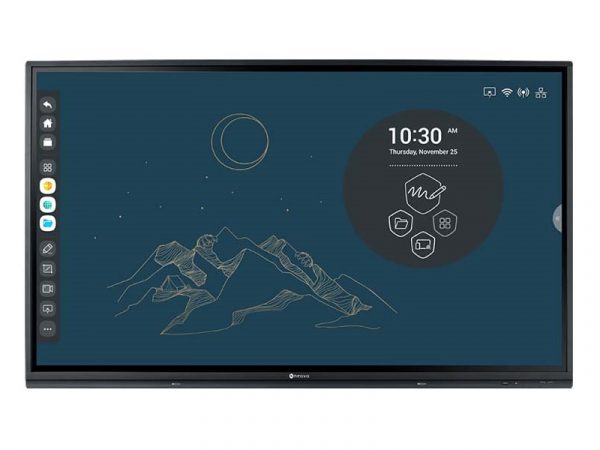
Touch screen TVs combine a commercial display panel with integrated touch sensing, letting users interact with displayed content by touching the screen directly. They support modern interactive workflows: digital whiteboarding in conference rooms and classrooms, interactive presentations with annotation, BYOD collaboration with multiple users contributing simultaneously, kiosk applications with user input, and digital signage with interactive content. Touch screen TVs have grown enormously in commercial AV as hybrid work and digital collaboration have become standard.
Touch screen TVs use several different touch-sensing technologies. Infrared (IR) touch uses a grid of IR beams across the screen surface; interrupting the beams identifies touch position. IR works through gloves and stylus, supports multiple simultaneous touches, and is the dominant technology in commercial interactive displays. Capacitive touch uses electrical capacitance changes from finger contact, providing very accurate touch but requiring direct skin contact. Optical touch uses cameras at the screen corners to detect finger position. Each technology has trade-offs in cost, accuracy, multi-touch capability, and durability.
Modern commercial touch screens support multi-touch: multiple simultaneous touch points, allowing pinch-to-zoom, multi-finger gestures, and multiple users collaborating on the same screen. Common multi-touch counts: 10-point (one user using all 10 fingers, or several users with limited fingers), 20-point and 40-point (enabling true multi-user collaboration with several people working on the screen simultaneously). For collaboration applications (digital whiteboarding, group brainstorming), 20+ point multi-touch is essential.
Touch screen TVs are often packaged with interactive whiteboard software: applications that turn the touch screen into a digital whiteboard for collaborative work. Major platforms include Microsoft Whiteboard (integrated with Microsoft Teams and Microsoft 365), Google Jamboard (integrated with Google Workspace), Zoom Whiteboard (integrated with Zoom meetings), and various third-party platforms. The software supports drawing, sketching, sticky notes, content embedding, and saving the whiteboard to cloud storage for participants. For modern conference rooms, the choice of whiteboarding platform often follows the organization's broader collaboration platform.
In education, touch screen TVs have largely replaced traditional interactive whiteboards (SMART Board, Promethean) as the dominant interactive display technology. The touch screen TV provides higher image quality than older projector-based interactive whiteboards, more reliable touch sensing, and integration with modern educational software. Teachers and instructors use touch screen TVs for interactive lessons, student presentations, digital handouts, and collaborative learning. K-12 and higher education are major segments for touch screen TVs.
Modern conference rooms use touch screen TVs for hybrid meetings: the touch screen displays the meeting content (Microsoft Teams Rooms, Zoom Rooms, Webex Rooms), enables in-room participants to annotate shared content, supports digital whiteboarding for collaboration with remote participants, and integrates with room PCs for content sharing. Touch screen TVs in conference rooms typically range from 65 inches (small to medium rooms) to 86 inches (large boardrooms) with full multi-touch support.
Touch screen TVs come in sizes matching commercial display needs. 55 to 65 inches serves small conference rooms and small classrooms. 65 to 75 inches serves typical conference rooms and standard classrooms. 75 to 86 inches serves large conference rooms, large classrooms, and small lecture halls. 86+ inches serves boardrooms and large lecture halls. Beyond 100 inches, touch screen technology becomes specialty and expensive; video walls with touch overlay or multi-screen touch arrays handle very large interactive surfaces.
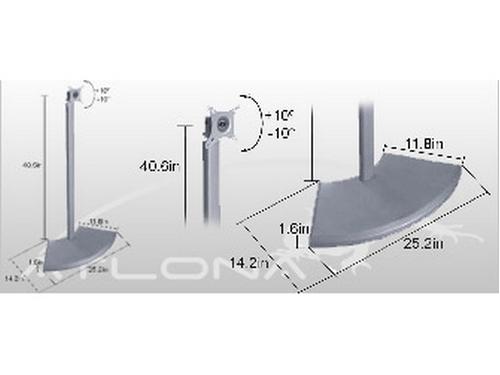
Touch screen TVs in commercial use need appropriate mounting: standard VESA mounts for wall installation, mobile carts for flexible classroom and event use, height-adjustable mounts for use by users of different heights (including wheelchair accessibility), and tilting mounts that let the display lay nearly horizontal for table-style use. The mounting choice significantly affects how the touch screen TV is actually used.
Many touch screen TVs include active pen support: a stylus with electronic communication to the screen (pressure sensitivity, button presses, fine-tip accuracy) for natural writing and drawing. Active pen support is essential for educational applications (writing on screen like a chalkboard or whiteboard), for design applications (sketching and annotating designs), and for any application where precise input matters more than finger gestures. Some touch screens support multiple pens simultaneously for collaborative use.
Touch screen TVs serve conference rooms and boardrooms (hybrid meeting displays with digital whiteboarding, in-room collaboration with remote participants), classrooms and education (interactive lessons, student presentations, digital handouts, replacing legacy interactive whiteboards), corporate training rooms (interactive training content, collaborative exercises), executive briefing centers (client presentations with annotation), houses of worship (interactive song lyric and graphics control from the platform), kiosks (self-service applications in retail, hospitality, transportation), and any commercial installation where direct user interaction with the screen matters.
Choose touch screen TVs for installations where user interaction with the screen matters: conference rooms with hybrid meetings and digital whiteboarding, classrooms with interactive teaching, training rooms with collaborative exercises, executive briefing centers with annotation during client presentations, kiosks with self-service applications. Choose regular displays for installations where the screen is purely a viewing surface: digital signage showing content to viewers, conference rooms used only for presentation viewing (no interaction needed), and any application where touch capability would be unused. Touch screen TVs cost more than regular displays of the same size; specify them only when the interactive capability will be used.
Major platforms reflect the organization's broader collaboration platform. Microsoft Whiteboard integrates with Microsoft Teams and Microsoft 365: in-meeting whiteboarding, collaboration with remote participants, integration with Teams documents and files. Google Jamboard integrates with Google Workspace: collaboration via Google Meet, integration with Google Drive. Zoom Whiteboard integrates with Zoom meetings: in-meeting whiteboarding for Zoom users. The choice typically follows the organization's primary collaboration platform; standardizing on one whiteboarding platform with the corresponding meeting platform simplifies the user experience.
For single-user applications (one teacher at the screen, one presenter), 10-point multi-touch is sufficient. For collaboration applications where multiple users work on the screen simultaneously (group brainstorming, design collaboration, classroom group work), 20-point or 40-point multi-touch is essential. The higher touch point counts enable several people to draw, annotate, and contribute simultaneously without interfering with each other. For most modern commercial applications, 20-point is the practical minimum; budget displays with only 10-point are limited for collaborative use.
Active pen support is a stylus with electronic communication to the screen, providing pressure sensitivity (light touches make thin lines, hard touches make thick lines), button presses for additional functionality, and fine-tip accuracy for precise drawing. Active pens are essential for educational applications (natural writing on screen), for design applications (sketching with precision), and for any application where precision matters more than finger gestures. Passive styluses (capacitive pens without electronics) work on capacitive touch screens but lack the precision and features of active pens.
Match the size to the room. Small conference rooms (4 to 8 people): 55 to 65 inches. Medium conference rooms (8 to 12 people): 65 to 75 inches. Large conference rooms (12 to 16 people): 75 to 86 inches. Boardrooms (16+ people): 86 inches and up. The size also depends on viewing distance: viewers at the back of the room need the screen large enough to read content. ANSI recommendations suggest the screen height should be roughly 1/6 to 1/8 of the maximum viewing distance. For interactive use, also consider the user reach: the touch screen needs to be accessible to users at the screen height when they stand to interact with it.
Conference rooms and boardrooms (the largest segment in modern commercial AV; hybrid meeting displays with digital whiteboarding and in-room collaboration with remote participants), classrooms and education (interactive lessons in K-12 and higher education, replacing legacy projector-based interactive whiteboards), corporate training rooms (interactive training content, collaborative exercises, hands-on instruction), executive briefing centers (client presentations with real-time annotation), houses of worship (interactive song lyric and graphics control from the platform, sometimes with multi-user collaboration), kiosks (self-service applications in retail, hospitality, transportation, healthcare wayfinding), and any commercial installation where direct user interaction with the screen matters to the application.

On order over $300 and more for US and US territory

We Offer a 30-Day Money Back Guarantee

Full manufacturer's warranty and quality assurance

Safe checkout with trusted payment providers