











Start typing to see results...
Find the perfect solution
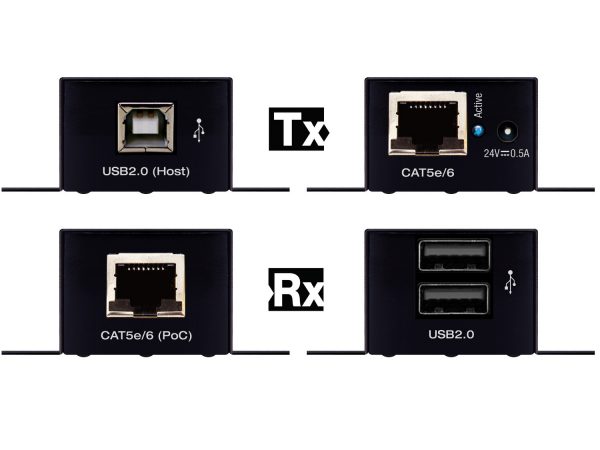
USB extenders carry USB signals over distances greater than standard USB cables can reach. Standard USB has strict length limits: USB 2.0 is reliable to about 5 meters (16 feet), USB 3.0 to about 3 meters (10 feet), and USB-C and USB4 at full bandwidth typically reliable to 1 to 2 meters for passive cables. When USB peripherals must operate far from the host computer (keyboards, mice, cameras, control panels, storage, audio interfaces), USB extenders bridge the gap. They come in two main forms: cable-based extenders that carry USB over CAT cable or fiber, and wireless USB extenders that carry USB without any cable.
USB was designed for short connections between a host computer and nearby peripherals. The protocol relies on precise timing between host and device, which makes long-distance extension technically demanding. USB extenders compensate for this with built-in signal regeneration, buffering, and protocol-specific handling. Quality extenders work transparently with the host and device; cheap extenders may cause intermittent disconnections, slow performance, or compatibility problems with specific peripherals.
USB over CAT extenders carry USB signals over standard CAT5e or CAT6 cable, typically up to 100 meters. They handle the timing issues internally, presenting the device as if it were directly connected to the host. Cable-based extenders are common in classroom installations (USB cameras at the front of the room, host PC in the rack), in security and CCTV (USB cameras to remote recording systems), and in any commercial AV installation where USB devices need to operate far from their host.
For very long distances (over 100 meters) or in environments with electrical interference, fiber optic USB extenders carry the signal over fiber for distances up to 10 km or more. Fiber USB extenders are common in industrial installations, medical facilities (where electromagnetic interference matters), and cross-building campus installations.
Wireless USB extenders use radio frequency to carry USB signals without any cable, typically over distances of 30 to 80 feet. They are convenient for installations where running cable is impractical or where the USB peripheral must remain mobile. Wireless USB is common in boardrooms (wireless USB cameras and microphones), in classrooms (USB devices that move between positions), and in rental and staging environments.
Match the extender to the USB version of the peripherals. USB 2.0 extenders work with USB 2.0 devices (keyboards, mice, basic cameras, control panels). USB 3.0 extenders handle higher-bandwidth devices (storage, high-resolution cameras, audio interfaces, video capture). USB 3.0 extension is more demanding than USB 2.0 because of the higher bandwidth and tighter timing requirements. Some extenders support multiple USB versions and gracefully fall back to USB 2.0 for compatibility.
USB carries power as well as data: USB 2.0 provides 0.5A at 5V, USB 3.0 provides 0.9A at 5V, USB-C with Power Delivery provides up to 100W or more. USB extenders typically handle power locally at each end (the receiver has its own power supply to deliver power to the connected device), since carrying high current over long cables is impractical. Always verify the extender's power delivery capability for the connected peripheral.
USB extenders serve classrooms and lecture halls (USB cameras, document cameras, and interactive devices at the front of the room driven by a PC in the rack), conference rooms (USB cameras, microphone arrays, and presentation devices), security and CCTV (USB cameras to remote recording systems), industrial installations (USB control panels and instruments far from the host PC), medical facilities (USB devices at patient beds connecting to nursing station PCs), broadcast and live production (USB control surfaces and audio interfaces extended from production rooms), and any installation where USB devices need to operate beyond direct USB cable distance.
USB has strict length limits because the protocol relies on precise timing between host and device. Standard USB 2.0 cable is reliable to about 5 meters (16 feet); USB 3.0 to 3 meters; USB-C and USB4 at full bandwidth typically to 1 to 2 meters. Beyond these distances, the timing fails: peripherals disconnect intermittently, run slowly, or don't enumerate properly. Active USB cables with built-in signal regeneration extend somewhat further (up to about 25 feet for USB 2.0), but for runs over a few meters at high bandwidth, dedicated USB extenders are the right solution.
Choose cable-based extension (CAT or fiber) when the install is permanent and reliability matters: classroom cameras, conference room cameras, industrial controls, security cameras. Cable-based extenders are more reliable, faster, and have no battery to manage. Choose wireless USB extension when the device must remain mobile (a USB camera that moves around a presentation space), when running cable is impractical (rental and staging events, temporary installations), or when convenience matters more than absolute reliability. Wireless USB typically supports 30 to 80 feet of range in clear conditions.
Distance depends on the technology. USB over CAT5e/6 extenders typically reach 100 meters at USB 2.0 speeds, somewhat less at USB 3.0 speeds. Fiber optic USB extenders cover 10 km or more, suitable for cross-building or cross-campus installations. Wireless USB typically supports 30 to 80 feet of clear line-of-sight, less through walls. Always check the extender's distance rating against the actual USB version you need: USB 3.0 extension is more demanding than USB 2.0 and may have shorter distance specifications.
Generally yes for standard USB devices, but some specialty peripherals (high-bandwidth video capture, audio interfaces with tight timing requirements, devices using proprietary USB extensions) may have compatibility quirks with specific extenders. Always check the extender's specifications for supported USB version (2.0, 3.0, or both), supported device classes (HID for keyboards/mice, video class for cameras, storage class, audio class), and any noted compatibility lists. For mission-critical applications, test with the actual peripherals before committing to the install.
Most USB extenders provide standard USB power at the receiver end (5V at 0.5A for USB 2.0, 0.9A for USB 3.0), enough for keyboards, mice, basic cameras, and control panels. For high-power USB devices (powered hubs, USB hard drives, high-current USB-C peripherals), the receiver may need supplemental power from a local power supply. USB-C extenders with Power Delivery (up to 100W) are rare and typically don't carry the full power over long cables; instead, they negotiate power locally at the receiver.
Classrooms and lecture halls (USB cameras, document cameras, and interactive devices at the front of the room driven by a PC in the rack), conference rooms (USB cameras, microphone arrays, and presentation devices that connect to the room PC or laptop), security and CCTV (USB cameras to remote recording systems), industrial installations (USB control panels and instruments operating far from the host PC), medical facilities (USB devices at patient beds connecting to nursing station PCs), broadcast and live production (USB control surfaces and audio interfaces extended from production rooms), and any installation where USB devices need to operate beyond direct USB cable distance.

On order over $300 and more for US and US territory

We Offer a 30-Day Money Back Guarantee

Full manufacturer's warranty and quality assurance

Safe checkout with trusted payment providers