







Start typing to see results...
Find the perfect solution
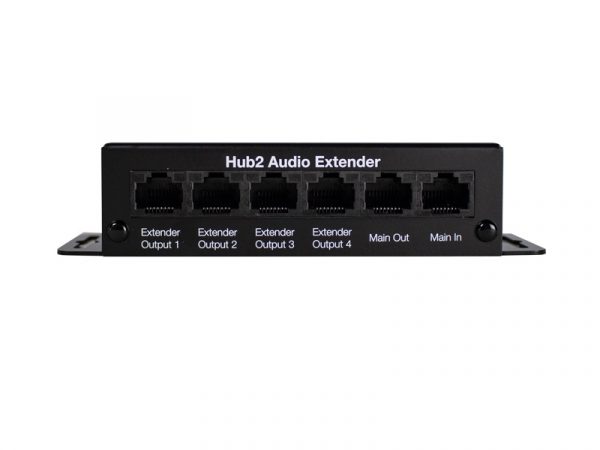
Audio extenders carry balanced or unbalanced, analog or digital audio signals over long distances. Common environments include residential AV systems, boardrooms, home theaters, training facilities, rental and staging events. Modern audio extenders typically use a single CAT5/6/7 cable to transmit one or more audio channels anywhere from 300 to 1000 feet, much further than the source audio cable could reach directly. This makes them essential whenever audio sources and destinations are far apart.
Different audio cables have different practical length limits. Unbalanced consumer audio (RCA, 3.5 mm) is reliable to about 5 to 10 meters in clean environments; longer runs pick up hum and noise. Balanced pro audio (XLR, TRS) is much better, reliable to 100 meters or more, but cable is expensive and bulky. Subwoofer cables and high-performing bass-managing cables may only go as far as 25 feet to maintain great quality. When sources and destinations exceed these distances, audio extenders bridge the gap using common CAT cable infrastructure or fiber.
Audio cables in use include 3.5 mm mono and stereo cables, SPDIF cables for digital audio, TOSLINK optical digital audio cables, RCA cables for analog stereo and digital coaxial, and specialty subwoofer cables. Audio extenders accept many of these formats at the input and convert internally for transport over the chosen medium (CAT cable, fiber, or specialty cable), then convert back to the desired output format at the receiver. Some extenders maintain the same format throughout (analog in, analog out), while others convert between formats during extension.
Many modern audio extenders use a single CAT5e, CAT6, or CAT7 cable to transmit audio anywhere from 300 to 1000 feet. The transmitter packages the audio onto the CAT cable; the receiver unpacks it at the other end. CAT-based audio extension is the dominant approach because CAT cable is inexpensive, easy to install, and often already pulled to the destination as part of the network infrastructure. The technology is similar to HDBaseT for video extension but optimized for audio signal types.
Specialty audio extenders handle multi-channel audio: stereo, 5.1 surround, multi-zone audio for whole-home systems, or many channels of pro audio. Some extenders carry 8 to 32 channels of digital audio over one CAT cable, useful in commercial installations where one cable run carries audio for multiple zones or rooms. For networked audio (Dante, AES67), specialized network audio infrastructure replaces traditional audio extenders entirely.
Audio extension adds latency: the time between the source signal arriving at the transmitter and the audio appearing at the receiver. Quality audio extenders keep latency under a few milliseconds, invisible for most applications. Cheap extenders may add 10 to 50 ms or more, which can cause noticeable lip-sync issues when audio takes a different path than the matching video. For commercial AV installations where audio-video sync matters, low-latency audio extenders are essential.
When searching for the right audio extender, consider what components you're using it with and the cable you're using. Extenders come in different shapes, sizes, and connectors; once you know the audio format you're working with, everything else simplifies. Verify the audio format (analog or digital, balanced or unbalanced, mono or stereo or multi-channel), the required distance, the available cable infrastructure (CAT, fiber, coax), and any required features (latency specifications, multi-channel support, control signaling).
Audio extenders are common in residential AV systems (audio from one room's source to another room's amplifier or powered speakers), boardrooms (audio routing within the room and to other rooms), home theaters (subwoofer and surround channel extension), training facilities and corporate AV (zone audio distribution), rental and staging events (audio runs between stage and mix position), houses of worship (audio paths between platform, booth, and overflow rooms), and any installation where audio needs to travel beyond direct audio cable distance.
You need an audio extender whenever the audio cable run exceeds the practical limit for the cable type in use. Unbalanced consumer audio (RCA, 3.5 mm) is reliable to 5 to 10 meters; balanced pro audio (XLR, TRS) is reliable to 100 meters or more. For runs beyond these limits, or when you want to use available cable infrastructure (CAT cable already pulled to the destination, for example) rather than running new audio cable, audio extenders bridge the gap. Common scenarios: residential audio between rooms, boardroom audio to remote zones, subwoofer placement far from the AV receiver, multi-zone whole-home audio.
A CAT-based audio extender pair takes the source audio at one end, packages it for transport over CAT5e, CAT6, or CAT7 cable, and reconstructs the audio at the receiver end. Distances of 300 to 1000 feet are typical. The technology is similar to HDBaseT for video extension but optimized for audio signal types. CAT-based extension is the dominant approach in modern audio installations because CAT cable is inexpensive, easy to install, and often already pulled to the destination as part of the network infrastructure.
Many do, depending on the specific extender. Some are stereo only (two channels); others carry 5.1, 7.1, or higher channel counts. Specialty pro audio extenders carry 8 to 32 channels of digital audio over one CAT cable. For complex installations (multi-zone audio, multi-channel surround, large pro audio systems), look for extenders explicitly rated for the channel count you need. For networked audio across many devices and locations, modern AV often skips traditional extenders and uses networked audio protocols (Dante, AES67) instead.
Audio extenders handle many formats: 3.5 mm stereo (consumer), RCA stereo (consumer), balanced XLR or TRS (pro), unbalanced 1/4-inch TS (instrument), digital coaxial SPDIF, digital optical TOSLINK, AES/EBU balanced digital, and specialty formats. Some extenders accept multiple formats at the input and let you choose the format at the output. For installations bridging consumer and pro audio (a laptop's 3.5 mm output to a balanced pro audio system, for example), an extender with format conversion handles both the format change and the distance extension in one device.
Quality audio extenders keep latency under a few milliseconds, invisible for most applications. Cheap extenders may add 10 to 50 ms or more, which can cause noticeable lip-sync issues when audio takes a different path than the matching video. For commercial AV installations where audio-video sync matters, low-latency audio extenders are essential. Always check the extender's latency specification, especially for applications like live performance audio, video conferencing, gaming, and any content where lip sync matters.
Residential AV systems (audio from one room's source equipment to powered speakers or amplifiers in another room), boardrooms (audio routing within the room and to other rooms for overflow or recording), home theaters (subwoofer placement far from the AV receiver, surround channels to remote ceiling speakers), training facilities and corporate AV (zone audio distribution to multiple training rooms from a central source), rental and staging events (audio runs between stage and mix position at concerts and events), houses of worship (audio paths between platform sources, booth, sanctuary speakers, and overflow rooms), and any installation where audio sources and destinations are too far apart for direct audio cabling.

On order over $300 and more for US and US territory

We Offer a 30-Day Money Back Guarantee

Full manufacturer's warranty and quality assurance

Safe checkout with trusted payment providers