











Start typing to see results...
Find the perfect solution
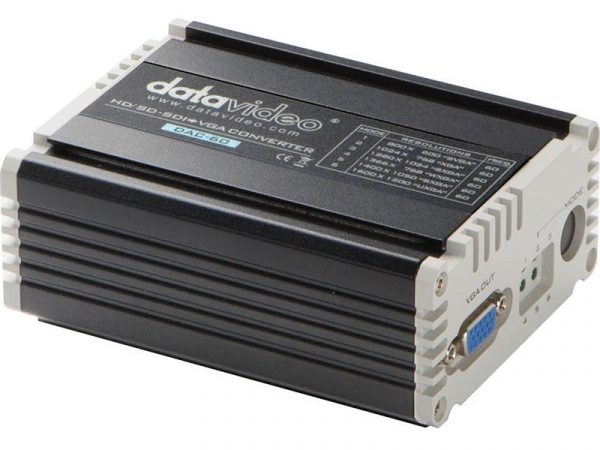
VGA video converters bridge VGA (Video Graphics Array) signals with other video formats. VGA is an analog computer video signal that was the dominant PC display interface for decades and remains widely deployed in legacy commercial AV, education, and specialty installations. VGA converters translate VGA to and from HDMI, DVI, DisplayPort, component, composite, S-Video, and SDI, allowing VGA equipment to work with the rest of the AV world.
VGA to HDMI is the most common direction: connecting an older PC, projector, or other VGA-output source to a modern HDMI display. The conversion is active: a digital-encoding chip converts the analog VGA signal into digital HDMI. Quality converters include built-in scaling so the VGA source can drive a modern 4K display at its native resolution. Audio is handled separately: VGA carries no audio, so the converter typically accepts a 3.5 mm audio input to embed into the HDMI output, or the audio takes a separate path.
HDMI to VGA goes the other direction: a modern HDMI source feeding a legacy VGA projector or monitor. This is also active, with a digital-to-analog converter (DAC) translating the HDMI signal to analog VGA. Audio breaks out on a separate 3.5 mm or RCA connector. Quality matters: cheap HDMI-to-VGA converters produce noisy, soft analog output; quality converters preserve the picture well. HDMI to VGA is common in schools, training rooms, and commercial environments where modern laptops need to drive legacy projectors.
VGA to DVI, VGA to DisplayPort, and VGA to SDI follow similar patterns: active conversion with optional scaling, separate audio handling, and quality depending on the converter. Each direction has specific use cases. VGA to DVI is rare today since DVI itself is mostly being phased out. VGA to DisplayPort serves installations with DisplayPort displays and VGA sources. VGA to SDI bridges legacy computers into broadcast workflows.
Most VGA converters include built-in scaling because VGA's variable resolutions and refresh rates rarely match the receiving display's preferred mode. Scaling normalizes the output to a clean, single resolution at the display's preferred rate. Without scaling, the display does its own conversion, often with mediocre results. Quality scalers preserve picture detail; budget scalers may soften the image.
VGA carries no HDCP because VGA is an analog signal without copy protection. When converting from HDMI (which uses HDCP) to VGA, protected content is typically blocked: the HDMI source refuses to send protected content to analog outputs to prevent recording. This is a fundamental limitation of HDCP-to-analog conversion, not a converter limitation. If you need to display protected HDCP-protected content (Blu-ray, streaming services) on a VGA-only display, the proper solution is replacing the display, not converting around HDCP.
VGA converters serve education (modern laptops to legacy VGA projectors, the single largest use case), training and corporate (the same scenario in business environments), hospitality (older displays in hotels with modern source equipment), houses of worship (older projectors with newer HDMI sources), schools and universities (legacy classroom equipment with new sources), and any commercial AV installation where modernization is ongoing and VGA equipment is still in service.
You need a VGA converter whenever you have to connect VGA equipment with non-VGA equipment: a modern HDMI laptop driving a legacy VGA projector, an older VGA PC connecting to a modern HDMI display, a VGA source feeding into a broadcast SDI system, and similar mismatches. Schools and training rooms are the largest single use case, because they often have older projectors with VGA inputs and need to support modern laptops and tablets with HDMI or USB-C outputs.
On the HDMI side yes, on the VGA side no. VGA's practical resolution limit is about 2K (2048x1536) at short distances on quality cable, with 1920x1080 reliable in typical installations. A VGA to HDMI converter can output 4K on its HDMI side by upscaling the VGA input to 4K, but the source resolution is still bounded by VGA limits. Converting 4K HDMI to VGA requires downscaling: the converter takes the 4K input and reduces it to a VGA-compatible resolution (typically 1080p or lower).
VGA carries no audio: it is a 15-pin connector for video only. The converter handles audio depending on direction. Converting VGA to HDMI: the converter accepts a separate audio input (3.5 mm or RCA) and embeds it into the HDMI output. Converting HDMI to VGA: the converter breaks out the HDMI audio on a 3.5 mm or RCA output, with the video going to the VGA display. Audio routing in VGA installations is always separate from the video path; this is one reason HDMI replaced VGA in most consumer applications.
No, generally. HDCP is a digital copy-protection scheme; analog outputs like VGA cannot be HDCP-protected. When converting HDMI source content to VGA output, the HDMI source typically refuses to send HDCP-protected content (Blu-ray, streaming services) to the converter to prevent recording the analog output. This is a fundamental HDCP design choice, not a converter limitation. If you need to display HDCP-protected content on a VGA-only display, the only solution is replacing the display with one that has HDMI input.
Quality matters more for VGA conversion than for purely digital conversions. Budget converters often use cheap chips that produce noisy or soft analog output (when converting to VGA) or poor digital encoding (when converting from VGA). Quality converters use better DAC and ADC chips, include proper EDID management on the digital side, support built-in scaling with good algorithms, and handle audio properly. For commercial installations where picture quality matters, always buy quality converters from established manufacturers rather than the cheapest option.
Schools and education (modern laptops to legacy VGA projectors, by far the most common use case; this is why VGA converters remain in significant production despite VGA itself being phased out), training rooms and corporate education (the same scenario in business environments), hospitality (older displays in hotel meeting rooms with modern source equipment), houses of worship (older projectors with newer HDMI sources from streaming and recording gear), schools and universities (legacy classroom equipment with new student laptops and tablets), and any commercial AV installation where the VGA infrastructure is still in active service and bridging to newer equipment is needed.

On order over $300 and more for US and US territory

We Offer a 30-Day Money Back Guarantee

Full manufacturer's warranty and quality assurance

Safe checkout with trusted payment providers