











Start typing to see results...
Find the perfect solution
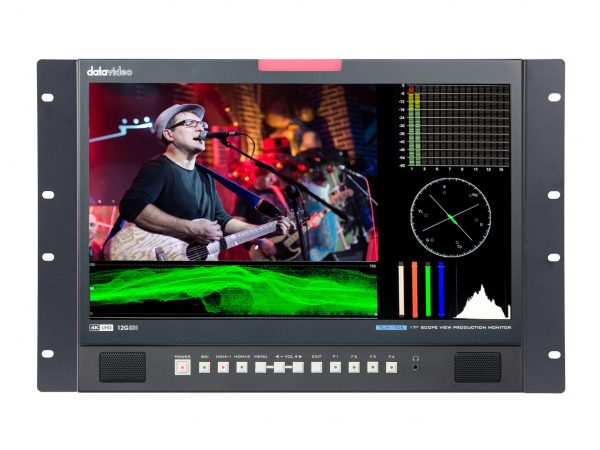
Test monitors and displays are specialty monitors designed for verifying, calibrating, and troubleshooting AV systems. Unlike consumer or commercial displays, test monitors typically include features for AV professionals: precise color reproduction, built-in test pattern displays, signal analysis tools, scope-style waveform displays, multiple input formats with cross-conversion, and the rugged construction needed for service work and broadcast facilities.
Broadcast and production reference monitors are designed for color-critical work in TV studios, post-production suites, and broadcast control rooms. They support SDI and HDMI inputs, calibrate to broadcast color standards (Rec. 709 for HD, Rec. 2020 for UHD, P3 for cinema), and serve as the reference image that the entire production matches. Quality broadcast monitors cost significantly more than consumer displays because of the precision color reproduction, calibration tools, and reliability needed for daily production use.
Field monitors are portable displays used by AV installers and field technicians for installation, troubleshooting, and on-site verification. They typically support multiple input formats (HDMI, SDI, DVI, VGA, component, composite) so the tech can verify any signal in the AV chain. Many include built-in test pattern generation, signal analysis tools, and battery operation for use without AC power. Common form factors include 5-inch to 9-inch portable monitors with rugged housings.
Multiviewers are specialty displays that show multiple video sources simultaneously on one screen: 2-up, 4-up, 9-up, 16-up, or custom layouts. They are essential in broadcast control rooms (showing every camera, graphics source, and playout simultaneously), security operation centers (showing many camera feeds), and any environment where one operator needs to watch many sources at once. Multiviewers may be standalone displays with built-in source switching, or they may be processors that combine many inputs into one HDMI or SDI output for a separate display.
Waveform monitors and vectorscope monitors are specialty test equipment for analyzing video signal characteristics. The waveform display shows luminance (brightness) levels across the signal, useful for setting exposure and checking video levels. The vectorscope shows color information, useful for checking color balance and saturation. These are essential for broadcast and post-production work where precise signal levels matter; quality production monitors often include built-in waveform and vectorscope displays.
Test monitors used for calibration work typically include hardware color calibration ports, support for external colorimeter instruments, and the ability to load custom 3D LUTs (Look-Up Tables) for matching to specific production color spaces. They are used in color grading suites for film and broadcast, in quality control for displays before installation, and in any environment where color accuracy is critical.
Regular consumer or commercial displays optimize for brightness, contrast, and appealing color reproduction, often with image processing (motion smoothing, noise reduction) that distorts the source signal. Test monitors do the opposite: they show exactly what the signal contains, with no processing that would hide problems. This makes test monitors essential for any work where you need to know what the signal actually is, not what a consumer display chooses to show.
Test monitors and displays are used in broadcast facilities (master control, studio cameras, post-production color grading), live event production (camera operators' confidence monitors, director's reference, switcher tech's confidence), AV installation and service (field techs verifying installations and troubleshooting), security operation centers (multiviewer displays), houses of worship with serious production, government and military command centers, and any environment where precise signal verification matters.
A regular consumer or commercial display optimizes for appealing image (high brightness, vivid color, smooth motion, often with image processing like motion smoothing and noise reduction). A test monitor does the opposite: it shows the source signal accurately, with no processing that would hide problems. This makes test monitors essential for verifying what the signal actually contains (for troubleshooting, calibration, or quality control), not what a consumer display chooses to show. Test monitors also typically support multiple input formats and include analysis tools that consumer displays lack.
You need a broadcast reference monitor whenever color accuracy is critical: color grading for film or TV, broadcast operations (where every monitor in the facility needs to show the same color), quality control before distribution, and any production work where the image needs to match a specific color standard (Rec. 709, Rec. 2020, P3). For casual viewing or general video work, a quality consumer display is fine; for production work that will be seen by audiences, reference monitors are essential.
A multiviewer is a specialty display or processor that shows multiple video sources simultaneously on one screen: 2-up, 4-up, 9-up, or custom layouts. You use a multiviewer wherever one operator needs to monitor many sources at once: broadcast control rooms (showing every camera, graphics source, playback, and playout), security operation centers (many camera feeds on one display), traffic and emergency dispatch, and any environment where situational awareness across multiple feeds matters. Multiviewers may be standalone displays or processors that combine many inputs into one output for a separate large display.
A waveform monitor displays the luminance (brightness) information in a video signal as a graph, with time across the horizontal axis and brightness level on the vertical axis. It lets you see exactly how bright every part of the picture is, which is essential for setting exposure correctly, checking video levels for broadcast compliance (legal levels), and ensuring consistent brightness across multiple sources in a production. Combined with a vectorscope (which shows color information), waveform monitoring is the foundation of professional video calibration and quality control.
For commercial AV service work, yes. A portable field monitor lets the tech verify signal at every point in the AV chain: source output, switcher output, distribution amplifier output, display input. Compared to relying on the customer's display (which may have its own quirks that hide source problems), the field monitor shows exactly what the signal contains. Quality field monitors support multiple input formats and include built-in test pattern generation and signal analysis. The investment pays back quickly in faster troubleshooting and confirmed installations.
Broadcast facilities (master control, studio cameras, post-production color grading, multiviewer walls), live event production (camera operators' confidence monitors, director's reference position, switcher tech's confidence display), AV installation and service (field techs verifying installations and troubleshooting on site), security operation centers (multiviewer displays for many camera feeds), houses of worship with serious production (confidence monitors and switcher reference), government and military command centers (situation awareness multiviewers), color grading suites, and any environment where precise signal verification or color accuracy matters.

On order over $300 and more for US and US territory

We Offer a 30-Day Money Back Guarantee

Full manufacturer's warranty and quality assurance

Safe checkout with trusted payment providers