













Start typing to see results...
Find the perfect solution
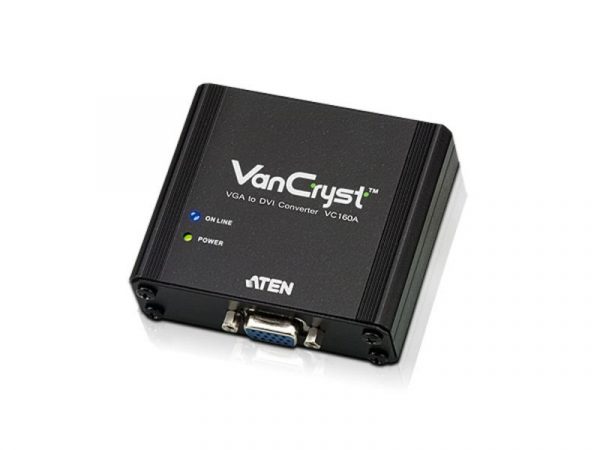
DVI (Digital Video Interface) was originally introduced as a new industry standard for transmitting uncompressed digital video content. It supports multiple variants: DVI-D (digital only), DVI-A (analog only), and DVI-I (digital and analog combined). Typical DVI supports up to 1920x1200 at 60 Hz on single-link cables; dual-link DVI doubles the bandwidth for higher resolutions and refresh rates. DVI video converters bridge DVI to other video formats (HDMI, SDI, VGA, component, composite, S-Video) so DVI equipment can work with the rest of the AV world.
DVI to HDMI conversion is the most common direction: connecting a DVI source (older PC, legacy display equipment) to a modern HDMI display. Because DVI-D and HDMI use the same TMDS digital signaling, this conversion is often done with a passive cable or adapter, not an active converter. The catch is that DVI carries no audio: when converting DVI to HDMI, an external audio input is usually needed to embed audio into the HDMI output, or the audio stays on a separate path through the AV system.
HDMI to DVI conversion goes the other direction: a modern HDMI source feeding an older DVI display. This is also often done with a passive cable, since the digital signaling is compatible. The HDMI audio is dropped (DVI doesn't carry audio); a separate audio path handles the sound. Common in commercial installations with legacy DVI displays still in service, especially in medical imaging, industrial controls, and KVM rooms.
DVI to SDI conversion bridges to broadcast infrastructure. It is an active conversion that takes the DVI digital video and re-encapsulates it as professional SDI on 75-ohm coaxial cable with BNC connectors. This is essential in broadcast facilities where computer graphics, slides, or other DVI sources need to enter the SDI production chain. The reverse (SDI to DVI) goes from broadcast equipment to computer-style displays.
Converting DVI to analog formats is an active conversion: a digital-to-analog converter (DAC) chip turns the digital DVI signal into the analog format needed by the destination. The output quality depends on the DAC quality: cheap converters produce noisy, soft analog output; quality converters preserve the picture well. DVI to VGA is common for connecting modern PCs to legacy projectors; DVI to component or composite is rarer and used in legacy mixing.
DVI converters come in single-link and dual-link variants. Single-link supports up to 1920x1200 at 60 Hz. Dual-link doubles the bandwidth to support 2560x1600 and higher refresh rates. Few DVI dual-link components are available in the market, so most converters are single-link. For specialty installations (medical imaging workstations, high-resolution computer monitors), dual-link converters exist but at higher cost.
Many DVI converters include built-in up/down scaling to support different resolutions the display can handle. This matters especially when converting between formats with different native resolutions, or when the source resolution doesn't match the display's preferred resolution. Quality scaling significantly improves the picture compared to letting the display do its own scaling.
DVI converters are common in residential and commercial applications including home theater (older DVI sources to modern HDMI displays), restaurants and sports bars (legacy DVI in equipment racks), hospitals (DVI medical imaging integrated with newer HDMI or SDI infrastructure), stadiums (DVI graphics computers feeding SDI broadcast or HDMI signage), and school settings (DVI computer outputs to VGA or HDMI projection systems). Hospitals are particularly heavy DVI users because regulatory certifications on existing displays make replacement impractical.
You need a DVI converter when bridging DVI equipment with equipment that uses a different signal format: DVI source to HDMI display (often passive), HDMI source to DVI display (often passive), DVI to VGA, DVI to component, DVI to SDI, or any combination going in either direction. The most common scenarios are connecting legacy DVI displays to modern HDMI sources (or vice versa) in commercial AV installations, and integrating DVI computer outputs with broadcast SDI or projection VGA systems.
Usually no. DVI-D (digital DVI) uses the same TMDS digital signaling as HDMI, so the conversion is electrically passive: a simple cable or adapter rewires the connector pins, and the signal passes through unchanged. The catch is that DVI carries no audio. When converting DVI source to HDMI display, the HDMI display gets video but no audio; you need a separate audio path or an active converter with audio embedding capability. When converting HDMI source to DVI display, the HDMI audio is dropped and needs a separate path to reach the room's sound system.
Single-link DVI supports up to 1920x1200 at 60 Hz (about 3.96 Gbps of bandwidth). Dual-link DVI doubles the bandwidth to support 2560x1600 and higher refresh rates (about 7.92 Gbps). Most DVI converters are single-link because few dual-link components exist in the market. For specialty installations like medical imaging workstations or high-resolution computer monitors that use dual-link DVI natively, dual-link converters exist but at higher cost. Always check whether your source and display use single-link or dual-link and match the converter accordingly.
DVI itself does not carry audio: it is video-only. The converter handles audio depending on the direction. Converting DVI to HDMI: the converter needs an external audio input to embed into the HDMI output, or audio takes a separate path through the AV system. Converting HDMI to DVI: the HDMI audio is dropped at the converter, with audio handling via a separate path. Converting DVI to SDI: the converter may accept a separate audio input to embed into the SDI signal (SDI carries embedded audio). Always check the converter's audio capabilities for your specific direction.
Many do, especially the more capable ones. Built-in up/down scaling lets the converter match the display's preferred resolution regardless of what the source provides. Common scenarios: 1080p DVI source upconverted to 4K HDMI for a 4K display, or 1920x1200 dual-link DVI downconverted to 1080p for a TV that doesn't support 1920x1200. Quality scaling significantly improves the picture compared to letting the display do its own scaling. Budget converters may skip scaling and pass through the source resolution directly.
Home theater (older DVI sources to modern HDMI displays, or vice versa), restaurants and sports bars (legacy DVI in equipment racks bridged to modern displays), hospitals (DVI medical imaging integrated with newer HDMI or SDI infrastructure; this is the largest single segment for DVI converters because hospitals keep DVI medical displays in service for decades), stadiums (DVI graphics computers feeding SDI broadcast or HDMI signage), school settings (DVI computer outputs to VGA or HDMI projection systems), and industrial controls (legacy DVI displays in plants bridging to newer infrastructure). Each environment has specific needs that determine the right converter capabilities.

On order over $300 and more for US and US territory

We Offer a 30-Day Money Back Guarantee

Full manufacturer's warranty and quality assurance

Safe checkout with trusted payment providers