













Start typing to see results...
Find the perfect solution
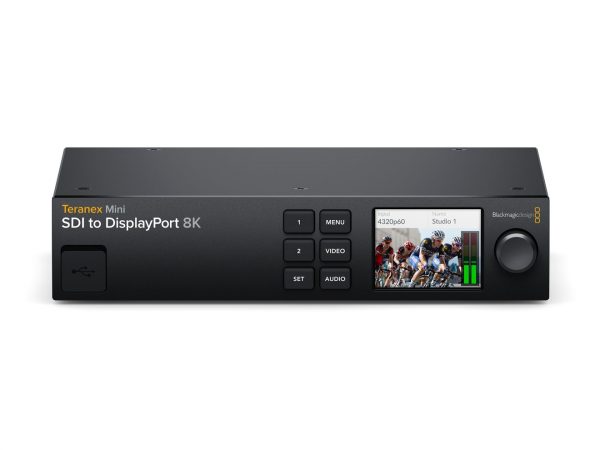
DisplayPort video converters bridge DisplayPort signals with other video formats. DisplayPort is the dominant high-bandwidth interface in PC, workstation, and pro-graphics environments, supporting resolutions up to 8K and high refresh rates. DisplayPort converters translate DisplayPort to and from HDMI, DVI, VGA, USB-C, and other formats, allowing PC and workstation sources to drive any kind of display in commercial AV installations.
DisplayPort to HDMI is the most common conversion direction: a PC, workstation, or laptop with DisplayPort output feeding an HDMI display. The conversion can be passive or active depending on the specific signals and bandwidths involved. Passive DisplayPort-to-HDMI cables work when both the source and the cable support the DP++ (DisplayPort Dual-Mode) standard, which lets DisplayPort output HDMI-compatible signaling. Active converters are needed for higher resolutions, dual-display configurations from one DisplayPort output (MST), or when the source doesn't support DP++. Always check the source's specifications.
HDMI to DisplayPort is the less common reverse: a modern HDMI source feeding a DisplayPort-only display (typical in trading floors, control rooms, and pro graphics workstations). This conversion is always active because HDMI cannot natively output DisplayPort signaling. Active converters need power (usually drawn from the connector or a separate USB cable) and translate the HDMI digital video into DisplayPort. Common in commercial AV installations where modern HDMI sources (laptops, streaming devices) need to drive DisplayPort displays in workstation environments.
DisplayPort can be converted to many formats with the right active converter: DisplayPort to VGA (for legacy projectors), DisplayPort to DVI (for older displays), DisplayPort to SDI (for broadcast infrastructure). Each direction handles specific bridging requirements between PC/workstation sources and various display formats. The converter must handle audio appropriately (DisplayPort carries audio, but VGA and DVI don't, so audio breaks out separately when going to those formats).
Modern laptops, tablets, and phones increasingly use USB-C as their primary output connector, carrying DisplayPort signal via DisplayPort Alternate Mode. USB-C to HDMI, USB-C to DVI, USB-C to VGA, and USB-C to DisplayPort converters all rely on this mode. The conversion is similar to standard DisplayPort conversion, but with the USB-C connector at the source end. Always check that the laptop's USB-C port supports DisplayPort Alt Mode (some don't), and that the cable or adapter supports the required mode and resolution.
DisplayPort supports MST (Multi-Stream Transport), which lets a single DisplayPort output drive multiple monitors in a daisy chain or via an MST hub. MST hubs are a specific kind of converter that breaks one DisplayPort connection into multiple independent display outputs (HDMI, DisplayPort, or DVI). They are widely used in workstation, trading floor, and control room environments where one DisplayPort source needs to drive several displays each showing different content.
Quality DisplayPort converters handle HDCP and EDID properly: passing protected content correctly between formats, and managing EDID negotiation so the source sees a consistent display description. Cheap converters often skip these, causing protected content to fail or resolution surprises. For commercial installations with mixed HDCP-protected content (streaming, corporate sources), verify HDCP version support.
DisplayPort converters are common in commercial AV environments with PC and workstation sources: control rooms (PCs and workstations driving display walls), trading floors (multi-monitor setups with one PC per trader), digital signage (DisplayPort PC media players feeding HDMI displays), corporate conference rooms (laptops with USB-C or DisplayPort outputs driving HDMI room displays), post-production suites (workstation graphics with mixed display formats), and any installation where DisplayPort sources need to integrate with other video formats.
You need a DisplayPort converter whenever you have a DisplayPort source that needs to drive a non-DisplayPort display, or a DisplayPort display that needs a non-DisplayPort source. Common scenarios: PC or workstation with DisplayPort output feeding an HDMI display in a conference room, modern laptop with USB-C (DisplayPort Alt Mode) feeding a legacy VGA projector, HDMI streaming device feeding a workstation-style DisplayPort monitor, broadcast SDI infrastructure connecting to DisplayPort displays in a control room. The converter handles the format change and may include scaling for matching different resolutions.
Sometimes, depending on the source's support for DP++ (DisplayPort Dual-Mode). DP++ is a feature that lets a DisplayPort output also produce HDMI-compatible signaling, so a passive cable adapter just rewires the connector pins and the HDMI display receives a normal HDMI signal. Many GPUs and laptops support DP++, but not all do. For 4K at 60 Hz or higher resolutions, an active converter may be needed even with DP++ source. Always verify the source's DP++ support and the converter's stated capabilities for your resolution.
An MST (Multi-Stream Transport) hub is a specific kind of DisplayPort converter that takes one DisplayPort input and produces multiple display outputs (HDMI, DisplayPort, or DVI), each showing independent content from the source. The source PC sees the MST hub as multiple connected displays, allowing the operating system to extend the desktop across them or show different content on each. MST hubs are common in workstation, trading floor, and control room environments where one PC drives multiple monitors from a single DisplayPort output. They are different from distribution amplifiers (which clone one source to many displays showing the same image).
Only if the laptop's USB-C port supports DisplayPort Alternate Mode (DP Alt Mode). Most modern laptops, tablets, and phones from major manufacturers support DP Alt Mode on their USB-C ports, but not all. Some entry-level devices have USB-C only for charging and data, without video output capability. Always check the laptop's specifications: look for "DisplayPort over USB-C", "DP Alt Mode", or "Thunderbolt 3/4 with DisplayPort". Without DP Alt Mode support, no USB-C to HDMI adapter will produce video output, regardless of how the marketing describes it.
Quality converters do; cheap converters often do not. HDCP is the copy-protection handshake required for content from Blu-ray, streaming services, and many corporate sources. DisplayPort supports HDCP the same way HDMI does, with versions 1.4 for 1080p protected content and 2.2 or 2.3 for 4K HDR. If a converter doesn't support the required HDCP version, the display shows a black screen or "non-compliant" error. Always verify HDCP support before deploying, especially when converting between DisplayPort and HDMI where both carry HDCP-protected content.
Control rooms (PCs and workstations driving display walls, often with MST hubs splitting one DisplayPort source into multiple independent monitors), trading floors (multi-monitor setups with one PC per trader, using MST hubs), digital signage (DisplayPort PC media players feeding HDMI commercial displays), corporate conference rooms (modern laptops with USB-C or DisplayPort outputs needing to drive HDMI room displays), post-production suites and video editing workstations (high-end graphics with mixed display formats), command and control installations, and any commercial AV installation where DisplayPort sources need to integrate with HDMI, VGA, DVI, or other video formats in the rest of the system.

On order over $300 and more for US and US territory

We Offer a 30-Day Money Back Guarantee

Full manufacturer's warranty and quality assurance

Safe checkout with trusted payment providers