












Start typing to see results...
Find the perfect solution
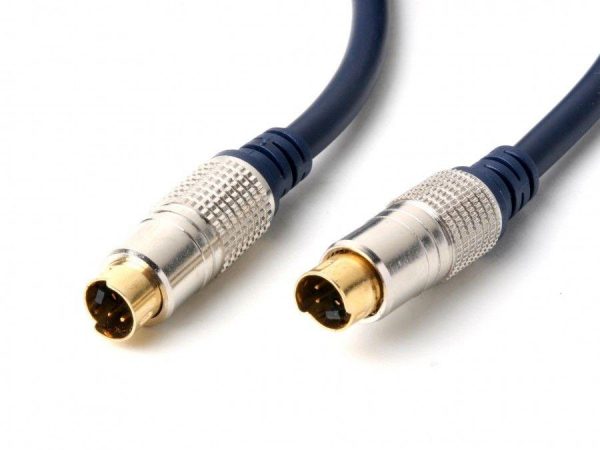
S-Video (Separate Video) is an analog video signal that outputs standard definition video at 480i (NTSC) or 576i (PAL). The name comes from the fact that black-and-white (luma) and color (chroma) signals are separated onto different conductors, which gives noticeably better image quality than composite video (where everything is mixed onto one wire), though still well below the quality of component or any digital format.
S-Video sits between composite and component in quality. Composite mixes brightness, color, and sync onto one wire, which the display must separate again, introducing "dot crawl" artifacts at color edges. S-Video keeps brightness and color on separate conductors throughout the signal chain, eliminating that step and giving a sharper picture. Component goes further, separating into three color channels for full HD support. So in increasing quality: composite < S-Video < component.
S-Video cables typically use a 4-pin mini-DIN connector at each end, a small round connector found on consumer VHS decks, DVD players, and older laptops. Non-standard 7-pin mini-DIN connectors are sometimes used with computer equipment, often carrying additional signals (like composite as a fallback) on the extra pins. 9-pin connectors with input and output capability are used on some specialty graphics systems. The core Y/C signals are compatible across all three connector types.
S-Video carries higher-frequency content than composite (because luma and chroma are separated), which makes it more sensitive to cable quality and length. Practical clean runs are about 15 meters (50 feet); beyond that, signal softness and color noise start to appear. Use a quality cable with proper shielding for longer runs, or pair the cable with an S-Video distribution amplifier or extender for distances beyond what raw cable can carry.
S-Video cables are sold in lengths from 1 meter for short connections (such as a VCR to a TV in the same equipment rack) up to 15 meters and beyond for longer runs (such as a centrally located source to a wall-mounted display). For commercial or pro installations, buy quality cable rather than the cheapest available; cheap S-Video cable produces poor color reproduction and visible noise.
S-Video carries video only (luma and chroma); it does not include audio on its connector. Any installation that needs audio along with S-Video video must run audio separately on a 3.5 mm or RCA cable. Most S-Video cables for commercial use come bundled with a parallel stereo audio cable, so video and audio travel together to the destination.
S-Video has been almost entirely replaced by component and digital formats in new equipment, but the format remains in service in legacy AV. Common uses include legacy security and CCTV (some analog cameras and recorders still use S-Video), broadcast monitoring of SD program feeds, older camcorders and editing systems, training equipment with VHS and DVD sources, retro gaming installations, and museum AV exhibits that preserve the look of period equipment.
S-Video is an analog video format that separates the luma (brightness) and chroma (color) signals onto separate conductors within the cable, giving a sharper picture than composite where both are mixed onto one wire. In composite video, the display must separate the luma and chroma at the receiving end, and this separation introduces "dot crawl" artifacts at color edges and reduces overall sharpness. S-Video skips that step entirely. Both formats cap at SD resolution (about 720x480 NTSC or 720x576 PAL), and S-Video is well below component or any digital format in absolute quality.
Mostly in legacy AV, security and CCTV, broadcast monitoring of SD program feeds, retro gaming, and museum AV. New consumer equipment has not shipped with S-Video for over a decade, but vast amounts of legacy hardware (VHS decks, DVD players, older camcorders, security recorders, and broadcast monitoring gear) still uses S-Video as a higher-quality alternative to composite. S-Video distribution amplifiers, cables, and extenders serve those installations, where replacing every piece of source equipment to migrate away from S-Video is not economically justified.
Standard S-Video cables use 4-pin mini-DIN connectors at each end, the small round connector found on consumer VHS decks, DVD players, and older laptops. Non-standard 7-pin mini-DIN connectors are sometimes used on computer equipment, often carrying additional signals (such as composite as a fallback) on the extra pins. 9-pin mini-DIN connectors with input and output capability appear on some specialty graphics systems. The core Y/C signals are compatible across all three connector types, so an S-Video signal can be routed between equipment with different connector counts via adapters.
About 15 meters (50 feet) on quality cable; longer with premium cable and proper installation. S-Video is more sensitive to cable length than composite because its higher-frequency content (luma and chroma separately) suffers more from cable resistance and capacitance. Beyond 15 meters, signal softness and color noise become visible on the display. For longer runs, use an S-Video distribution amplifier with built-in equalization, or pair the cable with an S-Video extender over CAT5/6 cable for very long distances. Quality cable construction (shielded, properly impedance-matched) extends the practical limit.
No. S-Video carries only video signals (luma and chroma) on its connector. Audio runs on a separate cable, typically 3.5 mm stereo or RCA. Most S-Video cables for commercial use come bundled with a parallel stereo audio cable, so video and audio travel together to the destination and arrive synchronized. When planning an S-Video installation, always plan parallel audio cabling, just as with VGA or any other video-only analog format.
Legacy security and CCTV (some older analog cameras and recorders still use S-Video for higher quality than composite), broadcast monitoring of SD program feeds (older monitor walls and routing equipment), training and education with VHS and DVD source material (older equipment that has not been replaced), retro gaming installations (preserving the look of original consoles on period CRT displays), older camcorder and video editing workflows (legacy nonlinear editors that still process S-Video), and museum AV exhibits where the equipment is part of the experience and cannot be modernized without breaking the exhibit.

On order over $300 and more for US and US territory

We Offer a 30-Day Money Back Guarantee

Full manufacturer's warranty and quality assurance

Safe checkout with trusted payment providers