











Start typing to see results...
Find the perfect solution
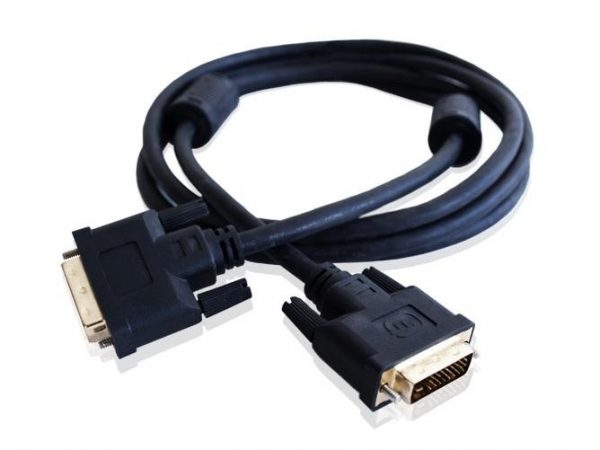
DVI (Digital Visual Interface) is a video display interface for digital video content. DVI cables connect a wide range of devices including HDTVs, computer monitors, projectors, graphics cards, and many other AV components. Although DVI has been largely replaced by HDMI and DisplayPort in new installations, it remains widely deployed in legacy commercial AV, industrial controls, medical imaging, KVM installations, and any environment where the existing source equipment and displays still use DVI.
DVI comes in three variants that look similar but are electrically different. DVI-D is digital only and is electrically compatible with HDMI's TMDS digital signaling. DVI-A is analog only and is essentially VGA in a different connector shape. DVI-I (integrated) carries both digital and analog signals on the same connector and works with either DVI-D or DVI-A cables. Always check which variant your source and display use, because plugging a DVI-D cable into a DVI-A jack will not work, and using the wrong variant can be confusing in mixed installations.
DVI also comes in two link configurations. Single-link DVI uses one set of TMDS pairs and provides about 3.96 Gbps of bandwidth, supporting up to 1920x1200 at 60 Hz. Dual-link DVI uses two sets of TMDS pairs and doubles the bandwidth to about 7.92 Gbps, supporting resolutions up to 2560x1600 and higher refresh rates. Dual-link cables have additional pins populated in the connector. For 2K and higher resolutions, all gear in the chain (source, cable, display) must be dual-link.
Native DVI cable is reliable to about 50 feet (15 meters); beyond that signal degradation becomes visible. For longer runs, use a DVI extender that converts the signal to CAT5e/6 or fiber for transport, then back to DVI at the far end. DVI extenders typically support 50 to 100 meters or more on CAT cable and several kilometers on fiber, depending on the model.
DVI is a video-only interface; it does not carry audio. Any installation that needs audio along with DVI video must run audio separately, typically over SPDIF coax, TOSLINK optical, balanced XLR/TRS, or unbalanced RCA. This is one of the main reasons HDMI replaced DVI in consumer AV: HDMI carries video and audio together.
DVI cables are still actively used in home theaters with legacy displays, hospitals (DVI is still common in medical imaging because regulatory certifications on existing displays make replacement impractical), restaurants and bars with older AV gear, industrial controls and SCADA systems, broadcast OB vans and TV studios with legacy infrastructure, KVM rooms, security operation centers, and corporate environments with installed bases of DVI projectors and monitors that work fine and have not been replaced.
Yes, in significant volumes. While new installations have largely standardized on HDMI, DisplayPort, and HDBaseT, the installed base of DVI equipment is enormous. Hospitals, factories, broadcast trucks, control rooms, and many corporate buildings have DVI infrastructure that works well and is not being replaced just for the sake of interface modernization. DVI is particularly common in medical imaging (where displays carry regulatory certifications that do not transfer to replacement units), industrial environments with long equipment lifecycles, KVM rooms, and any environment where reliability of existing equipment matters more than upgrading to the latest interface.
The three DVI variants differ in what signals they carry. DVI-D is digital only and carries the same TMDS signaling as HDMI internally. DVI-A is analog only and is essentially VGA on a different connector. DVI-I (integrated) carries both digital and analog on the same connector, so it accepts either a DVI-D or DVI-A cable. When buying equipment, DVI-I is the most flexible since it works with either signal type. When buying a cable, match the cable to the source and display: if both are DVI-D, use a DVI-D cable; if either is DVI-A, you need a DVI-A or analog adapter.
Single-link DVI provides about 3.96 Gbps of bandwidth and supports resolutions up to 1920x1200 at 60 Hz. Dual-link DVI doubles that to about 7.92 Gbps and supports 2560x1600 and higher refresh rates. Dual-link cables have additional pins populated in the connector. If your monitors are 2K (2560x1600) or higher resolution, you need dual-link equipment end-to-end: source, cable, and display. Using single-link gear in a dual-link chain will silently drop the resolution to the single-link maximum, which is confusing because the picture works but at unexpectedly reduced quality.
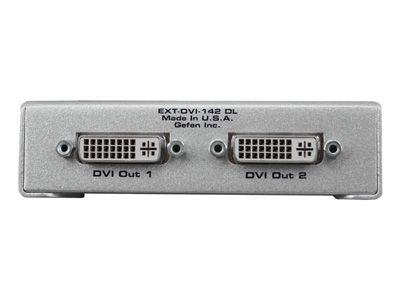
About 50 feet (15 meters) for reliable performance on standard DVI cable. Beyond that distance, signal degradation appears as sparkles, flickering, or no picture at all, especially at higher resolutions. For longer runs, use a DVI extender that converts the signal for transport over CAT5e/6 cable (typically up to 50 to 100 meters depending on resolution) or fiber optic (much longer, often kilometers). A common architecture in larger installations is one DVI source feeding a DVI distribution amplifier, with each output then extended via a DVI extender pair to the remote display.
No. DVI is video-only. If you need to transmit audio alongside DVI video, run a parallel audio cable (SPDIF coax, TOSLINK optical, balanced XLR or TRS, or unbalanced RCA). This is the main reason HDMI replaced DVI in most consumer applications: HDMI carries video and audio together on one cable. In commercial AV installations with DVI video, the typical solution is to route audio through a dedicated audio path using a separate audio distribution system, an audio matrix switcher, or an HDMI audio extractor if the source is actually HDMI being adapted to DVI.
Medical imaging (hospitals and clinics with radiology and diagnostic displays that have strict regulatory certifications), industrial controls and SCADA systems (plants with long equipment lifecycles), broadcast OB vans and TV studios with legacy infrastructure, KVM rooms and security operation centers, corporate AV systems with installed bases of DVI projectors and monitors, home theaters with one legacy display in an otherwise modern chain, restaurants and bars with older AV gear, and educational environments with classroom equipment that has not been replaced. In all cases, the cable is still the foundation; it just connects legacy equipment that continues to work.

On order over $300 and more for US and US territory

We Offer a 30-Day Money Back Guarantee

Full manufacturer's warranty and quality assurance

Safe checkout with trusted payment providers