Start typing to see results...
Find the perfect solution
Adapters bridge the gap between different connector types so equipment from different generations or different formats can work together. The Adapters subcategory groups the small connector-conversion accessories that AV integrators rely on every day: connector adapters (HDMI to DVI, DisplayPort to HDMI, 3.5 mm to RCA, and so on), connectors for cable termination, couplers that extend two cables into one, and fiber optic modules and accessories.
Connector adapters change one connector type into another while passing the signal through. The most common include DisplayPort to HDMI (for laptops that have only DisplayPort but need to drive an HDMI display), HDMI to DVI (for older displays that have DVI inputs), USB-C to HDMI (for newer laptops and tablets to display equipment), VGA to HDMI or HDMI to VGA (for mixed-generation installations), 3.5 mm to RCA audio, XLR to TRS, and dozens of less common combinations. Adapters can be passive (just rewiring the pins) or active (with conversion electronics inside).
Some adapter functions can be passive because the signal types are electrically compatible (HDMI to DVI is passive because both use the same TMDS digital signaling). Others require active conversion because the signal types are incompatible (DisplayPort to HDMI is sometimes active, HDMI to VGA is always active because it must convert digital to analog). Active adapters need power, usually drawn from the source connector (DisplayPort, HDMI, USB) or sometimes from a separate USB jack on the adapter itself. Always check whether the conversion you need is passive or active before buying.
Cable connectors used for field termination cover RJ45 for network cable, F-connectors for coaxial, BNC for video and SDI coax, banana plugs and spades for speaker cable, and many specialty connectors. Termination connectors are sold separately from the cable so installers can build custom-length cables on site, terminate them with the right connector for each end, and minimize waste compared to pre-made cable.
Couplers join two cables together to extend reach: HDMI couplers connect two HDMI cables to make one longer run, RJ45 couplers extend network cable, RCA couplers extend audio or analog video cable, and so on. Couplers should be used sparingly, because every coupler introduces a small signal degradation at the connection. For long runs, a single longer cable is usually better than two short cables coupled together; for digital signals approaching the cable's bandwidth limit, an active extender is even better.
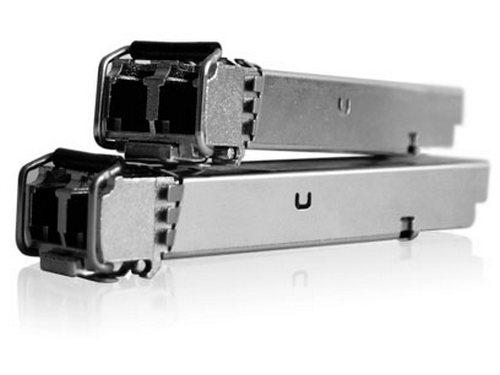
Fiber optic modules (SFP, SFP+, QSFP) plug into network switches and AV-over-IP equipment to add fiber optic connectivity. The module determines what the port supports: multimode fiber for short runs (up to about 500 meters), single-mode for long runs (up to many kilometers), and various data rates from 1 Gbps to 100 Gbps. These modules are essential in modern AV-over-IP installations where the network backbone is fiber.
Adapters and connectors are used everywhere AV equipment connects: in conference rooms where laptops with various output types must drive the room's display; in broadcast and live sound where microphones, cameras, and recorders use a mix of connector types; in field installations where cable must be cut and terminated to exact length; in security and CCTV where BNC and RJ45 connectors dominate; and in retail/digital signage where adapters make sources with varied outputs connect to standard inputs.
An adapter is usually a small passive accessory that changes one connector type to another without changing the signal format (HDMI to DVI is an adapter because both signals are electrically compatible). A converter is an active device that changes one signal format into a different one (HDMI to VGA is a converter because it must convert digital to analog). Adapters are typically inexpensive, do not need power, and just rewire the connector pins. Converters are usually more expensive, often need power, and contain electronics that translate the signal. In practice, the terms overlap and product naming is inconsistent, so always check what the device actually does.
For video, generally yes, because HDMI and DVI use the same TMDS digital signaling. A passive HDMI to DVI adapter just rewires the connector pins. The catch is that DVI does not carry audio, so when you use an HDMI source with a DVI display, the audio needs to take a separate path through an audio extractor or HDMI audio de-embedder. Also note that some specialized resolutions or HDCP versions may not pass through certain adapters, so test the specific source and display before committing to the install.
Generally yes for laptops, tablets, and phones that support DisplayPort Alternate Mode over USB-C, which is the standard way to output video from USB-C. The adapter contains active conversion electronics that translate the DisplayPort signal from USB-C into HDMI. Quality varies between adapter brands: cheaper ones may fail at 4K, may not pass HDR, or may have poor build quality and stop working after some flexing. For commercial AV installations, pick an adapter rated for the resolution you need (4K at 60 Hz at minimum for modern installs) and from a reputable manufacturer.
Use a coupler when you need to extend an existing cable in an emergency or temporary setup, when the alternative is running new cable through difficult conduit, or when you want to relocate equipment without pulling new cable. Avoid couplers in permanent installations and in long-run high-bandwidth applications, because every coupler introduces a small signal degradation, and digital signals near the cable's bandwidth limit may fail when run through a coupler. For permanent installs, a single longer cable is always preferable; for very long runs, an active extender pair is even better.
A fiber optic module is a small pluggable transceiver that fits into a port on a network switch or AV-over-IP encoder/decoder, allowing the port to connect via fiber optic cable instead of copper Ethernet. SFP modules support 1 Gbps, SFP+ supports 10 Gbps, and QSFP supports 40 Gbps or 100 Gbps. You need a fiber module whenever your installation requires fiber instead of copper: for long cable runs (over 100 meters), for very high bandwidth (multi-channel 4K AV-over-IP), for runs between buildings, or in environments with electrical interference where fiber's immunity matters.
Conference rooms (laptops with various output types must drive room displays, requiring USB-C to HDMI, DisplayPort to HDMI, mini-DisplayPort, and similar adapters), broadcast and live sound (microphone, camera, and recording gear use mixed connectors that often need adapting on site), field installations and rental/staging (cable cut to length and terminated with the right connector for each event), security and CCTV (BNC and RJ45 dominate), retail and digital signage (adapters bridge varied source outputs to standard display inputs), and any AV environment where equipment from different generations or formats must work together.

On order over $300 and more for US and US territory

We Offer a 30-Day Money Back Guarantee

Full manufacturer's warranty and quality assurance

Safe checkout with trusted payment providers